
The hidden cost of running systems after hours.

Your business space is often “on” when no one’s there.
Many businesses focus on what happens during operating hours, but the biggest waste may happen when no one is there to notice it. Lights stay on, HVAC systems keep empty rooms heated or cooled and temporary overrides become permanent habits.
After-hours energy use is easy to miss because it doesn’t usually disrupt your operations, but it can quietly increase monthly costs and put unnecessary strain on equipment.
If your space is “on” when your business is closed, you may be paying for energy that is not helping your customers, employees or operations.
The good news? You do not have to overhaul your entire building to find savings. In many cases, the smartest first step is simply asking: What’s still running when no one is here?
Why after-hours waste is so easy to miss.
Energy waste often hides in your daily routine. A business may have reasonable operating hours, but systems may not be programmed to match them. A shop may close at 6 p.m., but the HVAC system may stay in occupied mode until midnight. Or an office may be empty on Saturdays, but lights and thermostats may still follow weekday settings. Some restaurants may need certain back-of-house systems running after close, while the dining area no longer needs the same level of heating, cooling or lighting.
Here’s why this happens:
- Businesses change hours but do not update controls.
- Employees manually override HVAC or lighting schedules and forget to reset them.
- Cleaning crews, delivery windows or maintenance visits extend system run times.
- Older controls may be difficult to adjust or may not reflect real occupancy.
- Owners and managers may not have visibility into when energy is actually being used.
For small and medium-sized businesses, everyone is busy. Scheduling gaps happen because energy management is rarely someone’s only job. Owners and managers are focused on staffing, customers, inventory and the daily realities of keeping the business moving. Updating schedules and checking controls can easily fall to the bottom of the list.
The most common after-hours mistakes.
1. Lighting that stays on longer than needed.
Lighting is one of the easiest places to spot after-hours waste. Indoor lights, parking lot lights, signage, exterior security lighting and back-of-house areas can all add up.
Of course, some lighting is important for safety, security and visibility. The goal is not to turn everything off. The goal is to make sure the right lights are on, at the right level, at the right time.
That might mean adding occupancy sensors in storage rooms or restrooms, using timers for signage, installing daylighting controls in areas with strong natural light or zoning lighting so an entire building is not fully lit when only one area is in use.
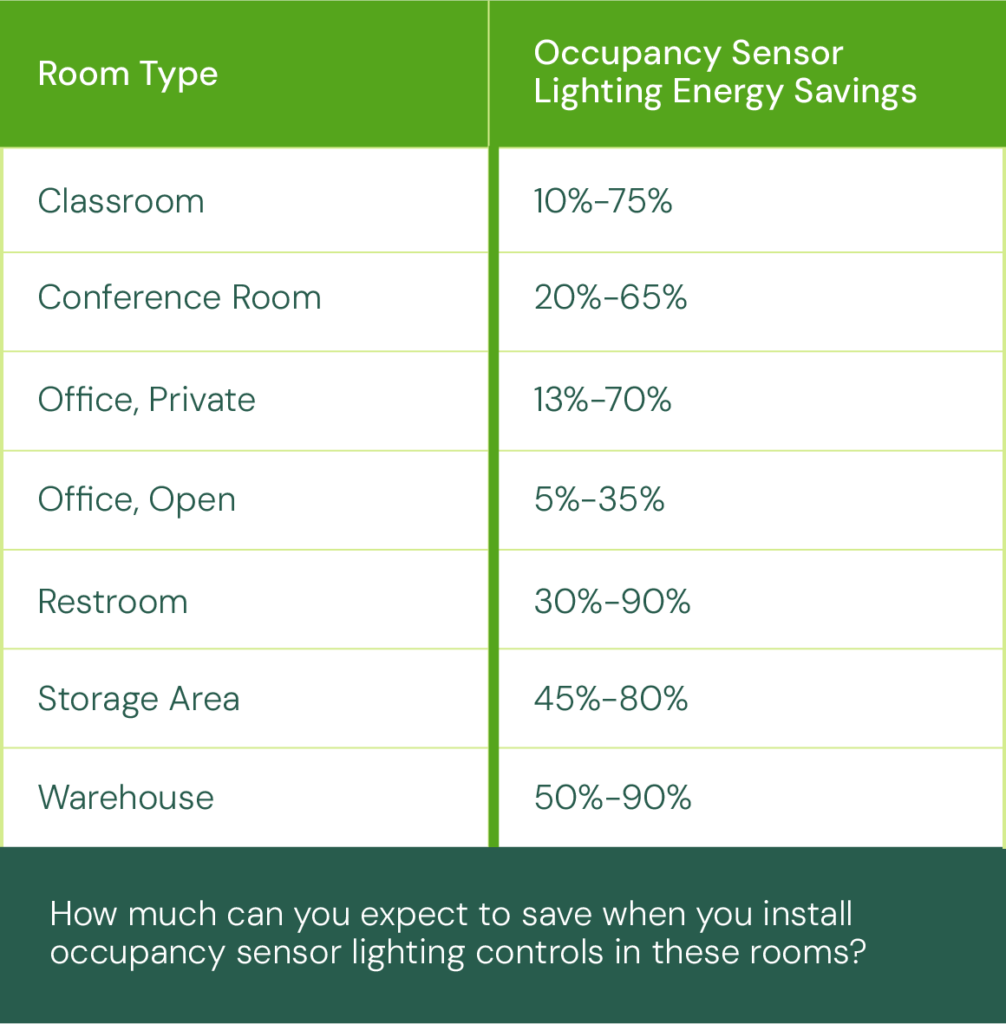
Action item: In addition to adding sensors, consider upgrading to LED lighting. LEDs can make a meaningful difference. They use less energy than traditional lighting and produce less heat, which may also help reduce strain on cooling systems during warmer months.
2. HVAC systems that do not match business hours.
Heating and cooling empty spaces can be one of the most expensive forms of after-hours waste. HVAC schedules may be set too broadly, run on weekends unnecessarily or fail to account for seasonal changes.
Common examples include:
- A retail space is cooling at the same level overnight.
- An office building runs HVAC on Saturdays even when no one is there.
- A restaurant keeps dining areas conditioned long after close.
- A clinic or professional office uses a single schedule for the entire building, even when only a few rooms are occupied.
Programmable or smart thermostats can help businesses better match heating and cooling to real occupancy. According to the U.S. Department of Energy, turning your thermostat temperature down by 7°–10°F for eight hours a day can save as much as 10% a year on heating and cooling.
Action item: If a space is empty, it probably does not need to be heated or cooled the same way it is during peak operating hours. Invest in smart thermostats and review your off-hours settings.
3. Manual overrides that become the new normal.
Manual overrides can be useful. A late meeting, maintenance visit or unusually hot day may require a short-term adjustment. The problem starts when no one checks whether those changes were reset. A thermostat override for one evening can become the new normal when a temporary setting for an event can quietly run for months.
Action items: These small issues are not always obvious, but they can add up. Building a simple review process can help.
- Check thermostat settings monthly.
- Review lighting schedules when business hours change.
- Make sure overrides expire automatically when possible.
- Assign someone to own the schedule so systems do not run by default.
For more tips, review this office checklist from the Federal Energy Management Program at the Department of Energy.
4. Other equipment may be running, too.
Lighting and HVAC are often the easiest places to start, but they are not the only sources of after-hours energy use.
Depending on the business, compressors, refrigeration equipment, exhaust fans, water heaters, vending machines, kitchen equipment, office equipment or other systems may also run longer than needed. Some of that equipment may need to stay on for safety, product quality or operational reasons. Some may not.
Action item:
A simple after-hours walkthrough can reveal a lot. Walk the building after close or before opening and listen for equipment, look for lights and check thermostats.
What effective scheduling and controls can actually change.
Turn scheduling challenges into opportunities. More intentional scheduling matches energy use to real business needs.
Benefits include:
- Lower monthly utility costs.
- Reduced wear on equipment.
- More consistent comfort during occupied hours.
- Fewer emergency repairs are needed when systems are not overworked.
- Better visibility into how the building actually operates.
- A stronger starting point before investing in larger upgrades.
The goal is not to turn everything off. It is to make sure every system is running for a reason.
When equipment upgrades make sense.
Upgrades are the next step after finding obvious scheduling gaps. For many small- to medium-sized businesses, better controls and newer equipment can make it easier to maintain savings.
But you should also consider whether older equipment is limiting your savings.
Potential upgrades may include:
- LED lighting replacements.
- Lighting controls and occupancy sensors.
- Programmable or smart thermostats.
- High-efficiency HVAC equipment.
- Building controls that allow better scheduling by zone or occupancy.
Not every business needs a major overhaul. Sometimes the best improvement is a smaller upgrade that solves a specific problem.
Not sure where to start? TVA EnergyRight’s Smart Energy Starter Kit can help small businesses take simple first steps toward reducing waste and improving efficiency.

How incentives can help offset upgrade costs.
For small and medium-sized businesses, incentives may help offset the cost of eligible upgrades, including lighting, HVAC or other efficiency improvements.
TVA EnergyRight offers business incentives and expert guidance to help eligible businesses identify energy-saving opportunities, upgrade equipment and reduce project costs. A TVA Energy Expert can help your business find the right incentives to fit your needs.
The bigger payoff: A business that runs more efficiently.
When schedules, controls and equipment work together, businesses like yours can reduce waste, protect equipment and create a more efficient space without disrupting the way they serve customers. You can also build a stronger foundation for future upgrades by understanding how your building actually operates.
Energy savings do not have to start with a major renovation. Sometimes they start with a walkthrough, a schedule check or one simple question: What is still running when no one is there?
Need a little boost to get your savings started? Order a free Business Energy Kit by Sept. 24 and you’ll be automatically entered in the Business Booster sweepstakes — plus you get a $20 gift card. Two winners take home a $2,000 prize pack, and $500 weekly prizes are up for grabs. Enter now!

Related stories
-
 Business & Industry
Electrification versus efficiency: Where should industrial facilities focus first?
View moreAccording to the U.S. Department of Energy (DOE), the industrial sector accounts for about one-third of U.S. energy-related carbon dioxide emissions, making industrial energy strategy a high-impact area. As industrial facilities look for ways to meet sustainability goals, optimize operations and invest in energy efficiency, moving certain equipment and processes to electricity can potentially be […]
-
 Business & Industry
Offset costs and increase your ROI: Incentives for equipment upgrades explained.
View moreA guide to how energy incentives support real projects, reduce costs and improve ROI. Utility energy incentives for equipment upgrades can seem complicated from the outside. Many businesses and organizations assume they involve lengthy applications, rigid requirements or projects designed specifically to qualify. But if you take a closer look, you’ll see that incentives are […]
-
 Business & Industry
6 bright ways LED lighting supports workplace productivity.
View moreCutting operational costs without sacrificing quality or efficiency can be challenging for small to medium-sized businesses. Happily, controlling energy costs and making energy efficiency upgrades is a great way to protect your business’s profit margins while improving your work environment. Which brings us to LED lighting: Upgrading your lighting systems is one of the most […]